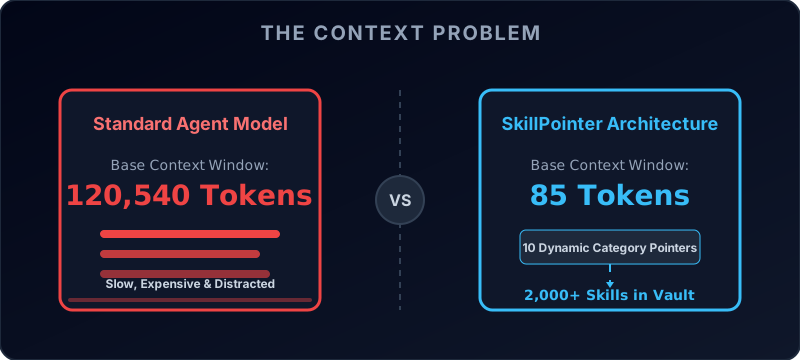
SkillPointer is a cutting-edge Retrieval-Augmented Generation (RAG) architectural pattern specifically engineered for OpenCode, Claude Code, and other local AI development agents.
It solves the biggest problem with massive AI skill libraries: Context Window Bloat.
🛑 The "Token Tax" Problem
When you install community skill packs (e.g., hundreds of animation principles, API guidelines, frontend best practices), your AI agent automatically scans all of them and loads their descriptions into its background context window on every single prompt.
If you have 2,000 skills, that requires thousands of tokens just for the AI to "remember" what it knows, before it even looks at a single line of your actual codebase.
- It vastly slows down AI response times.
- It drastically inflates API costs.
- It degrades reasoning (often causing timeouts or unrelated hallucinations during deep research tasks).
⚡ The Pointer Solution
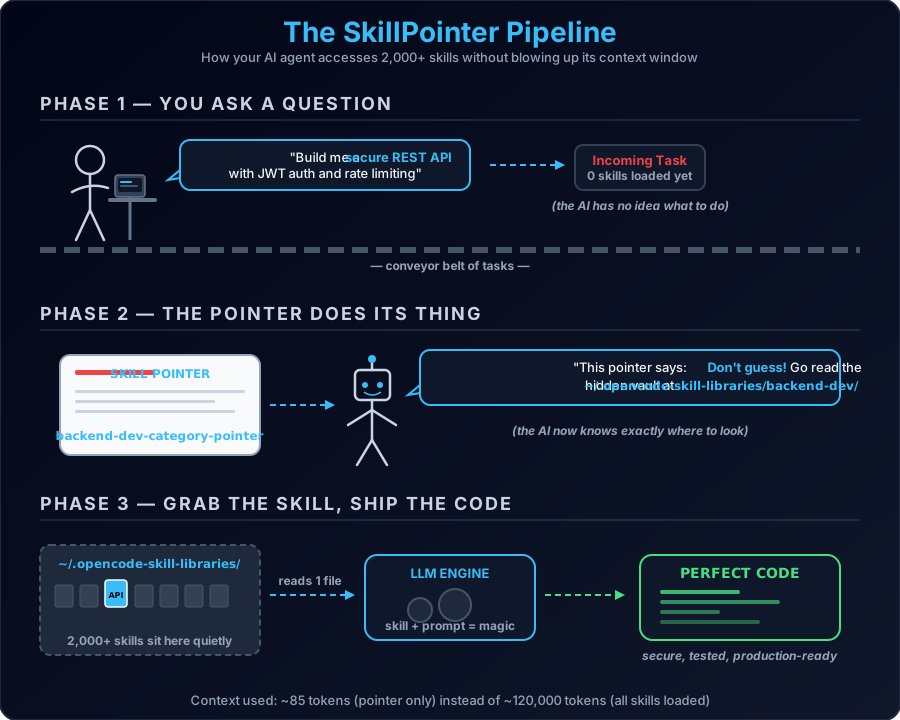
SkillPointer completely hacks your agent's context model natively by reorganizing your library:
- Hidden Vault Storage: It moves all of your raw skills into an isolated
directory (e.g.,
~/.opencode-skill-libraries/). The AI's native startup scanner cannot see them here. - Category Pointers: It replaces those 2,000 skills with a handful (e.g., 10-30)
of lightweight "Pointer Skills" inside your active
skills/directory (e.g.,web-dev-category-pointer). - Dynamic Retrieval: When you ask a question, the AI only reads the pointers. The pointer instructs the AI: "I don't have the skills loaded, but you must use your command-line tools to read the hidden vault and find the exact file you need first."
The result? The AI can access 10,000+ skills instantaneously, but its baseline background context is essentially zero.
🚀 Installation & Setup
We have provided a beautiful, zero-dependency Python script that will instantly convert your bloated skills directory into a blazingly fast Hierarchical Pointer Architecture.
Step 1: Run the Setup Script
Download and run the provided setup.py script. The PRO engine will automatically
categorize your flat skills into dozens of distinct expert domains (e.g., ai-ml,
security, frontend, automation) using our built-in keyword
heuristic engine.
python setup.pyStep 2: Test Your Infinite Context!
Start your AI agent and ask it to fetch a specific skill. For example:
"I want to create a CSS button. Please consult your web-dev-category-pointer first to
find the exact best practice from your library before writing the code."
Watch the execution logs:
- The AI effortlessly reads the pointer.
- The AI uses its native command-line tools to instantly browse the hidden vault.
- The AI reads only the specific markdown file it needs.
- It generates perfect code.
🛠 Manual Implementation Guide
If you prefer to set this up manually without the setup.py script, you simply need:
- A hidden library directory (e.g.,
~/.opencode-skill-libraries/animation) - Your actual markdown skills placed inside that hidden directory.
- A
SKILL.mdPointer File inside your active~/.config/opencode/skills/animation-category-pointer/directory that tells the AI precisely where to look. (See the Python script code for the optimal Pointer prompt formula).
Open Source
Open-sourced to optimize AI environments for developers everywhere. Built by breaking the limits of agentic workflows. Check out the GitHub Repository for more details.